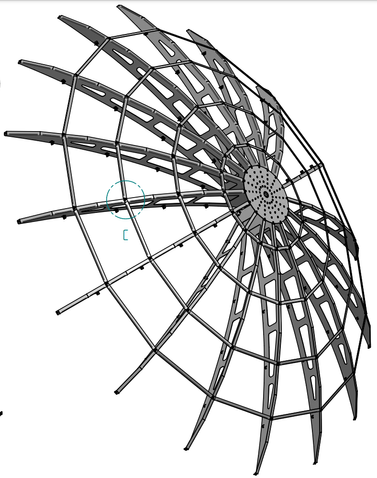
4.8M EME dish

4.8 meter dish for EME (moonbounce)

Quick links to sections below: 


Once ready, the complete design for all the mechanical parts will be published here.

Current state of construction

This will typically be the last pictures I took during the latest phase of construction.

History and background

In 2022 I decided it was time to get back on EME (Moonbounce) again. My old EME dish (taken down in 2004 and now doing its job in Sweden at SM7GVF's place: SM7GVF Dish) was an 8 meter dish, it worked fine and was mechanically ok. During the last 20 years, things have changed a lot, modern 3D design tools have arrived etc., and I have gained a lot more experience in various fields.


I'm not getting any younger! My oldest dish was 5 meter and the last one 20 years ago was 8 meter. The 5 meter dish was easy to handle and construct, the 8 meter was a beast to handle!

To save some time, I have this time, chosen to get a finished "kit" for a 4.8 meter dish. Zdenek, OK1DFC, offers a line of laser cut dish kits, ranging from 1.8 meter to 4.8 meter in diameter.


When making dish systems in this size, the biggest job is not the dish itself (although this can also be a monumental task) but rather the mount (Az/El) and the general tower construction. The forces on the dish in a severe storm can be extreme so (some) clever design and careful planning is needed. On top of this, I also wanted a design that "a single person" could install and handle. As I have limited access to the part of my garden the dish was going to be installed in, cranes and lifts etc. was not an option.


All the mechanics for the tower and elevation system was also ordered thru Zdenek OK1DFC and handled superbly by Václav OK3VM (which is also handling the parts for the dish kit).


For the azimuth/elevation I will be using "Slewing drives". These have gained more and more popularity within the EME community, they are readily available (from China) and the prices are pretty fair. The forces they can stand (according to their datasheets) are pretty impressive. More on this later on.


The tower structure will be designed so it is possible to lower the dish/mount to the ground using an winch. This will make it much easier to assemble and to service the system later on (again, I'm not getting younger ;).


During the design, I have looked a lot around on the internet for ideas and hints of construction, Wolf DF7KB has shared some of his construction ideas as he is using the same 4.8m dish, this has been great inspiration!

Rotor system / slew drive

As the dish itself is already decided, I first focused on the rotor system that is going to move the dish. I know from past experience that the rotor can NOT be too strong, the forces that will be seen during a storm are very big. Here in Denmark we see storms that has gusts above 30+ m/s, sometimes peaking to 40+ m/s (160 km/h).


As I have previously installed (and still using) a 3 inch dual axis slewing drive from Coresun in China for my (small) 70cm EME system, I turned to them again for the rotor. 


Coresun offers a 7 inch combined Az/El drive (and also a 9 inch). This drive can be delivered with different motor configurations, I selected a stronger motor for the elevation and a stronger/faster motor for the azimuth. The 7 inch drive has a weight of close to 85 Kg, the 9 inch is a massive 135 Kg!


I have always found that Coresun are extremely helpful to work with, they are quick and replies very fast to questions etc. Prices are also very fair from them. On top of that, they have 3D STEP files for all their drives which makes it very easy to do CAD designs using their drives.


The datasheet for the actual drive I use can be downloaded here

Here is the most important specifications for the drive. As the drive has to "carry" the weight of the dish and feedhorn, the elevation axis has to strong. If possible, I would like to avoid having counterweights.


Elevation

With the stronger elevation motor I got, the elevation axis has an rated output torque of 5250 Nm and a holding torque of 42000 Nm, speed is rated at 0.05 RPM (5 minutes for 90 degrees). 

Gearing on motor/planetary gear is 680.3:1, slewdrive 60:1 for a total of 680.3 * 60 = 40818 * 2 pulses (hall sensor sees two pulses each rotation of DC motor) => 81636. With x4 quadrature this is 326544 pulses for 360 deg. => 907.067 pulses/degrees.


During testing, I saw 81290 pulses for 90 degree movement. This equals 903.22 pulses/degree (325160/360 degrees). With the 60:1 reduction in the slewdrive, the planetary gear has 677.42:1 gearing.


I measured the speed on the drive delivered, at 24V (100% PWM duty cycle) the elevation moves 0.36 degrees/second. This means approximately 250 seconds (4m10s) for 90 degree movement (with no load).


The drive delivered with the "standard" elevation motor has an output torque of 2100 Nm at 0.05 RPM (5 minutes for 90 degrees).


Azimuth

With the upgraded motor, the azimuth (horizontal) axis has (only) an output torque of 870 Nm and holding torque of 10400 Nm, but speed is rated at 0.108 RPM (9.3 minutes for 360 degrees).

Gearing on motor/planetary gear is 234:1, slewdrive 71:1 for a total of 234 * 71 = 16614 * 2 pulses (hall sensor sees two pulses each rotation of DC motor) => 33228. With x4 quadrature this is 132912 pulses for 360 deg. => 369.2 pulses/degrees.


In actual tests, the resolution came out as 290.65 pulses/degree. This corresponds to 290.65 * 360 = 104634 in x4 quadrature, so 26158.5 x1 quadrature pulses from hall sensors, divided by 2 => 13079.25 rotations on output of planetary gear. We know that the slewdrive has 71:1 reduction, so planetary has 184.215 : 1 reduction (instead of the 234:1 in datasheet)!

Coresun confirmed that the motor/gear installed is indeed with 184:1 reduction.


I measured the speed on the drive delivered, at 24V (100% PWM duty cycle) it took 480 seconds for a 360 degree movement (with no load).


With the standard motor, the azimuth axis has an output torque of 820 Nm but a speed of only 0.042 RPM (24 minutes for 360 degrees!).


You can see that the azimuth has a lot less torque compared to the elevation axis, this is not a problem as it should only turn the system in the horizontal plane. What really matters is the holding torque, especially on the elevation axis.

Rotor controller

There are quite a few rotor controllers available, some which are very capable. In this setup, I chose to use my own developed rotorcontroller, the URC. I already run this in my 70cm EME system (with a SVH3 3 inch slew drive) and it has so far proven to be extremely reliable. One of the benefits of using my own controller is that I can add and change features as I see fit (and why make things simpler by buying one, when you can make it more complicated by developing your own ;).

The URC controller uses the incremental (Hall) sensors inside the slew drive for both azimuth and elevation. The URC is using dedicated quadrature decoder hardware inside the used Cortex M7 CPU (600 MHz NXP i.MXRT1064) for the decoding (only proper way of doing this). In addition to the 600 MHz CPU, the URC also has 32 MByte of SDRAM, 4 MByte of Flash memory (for code) and 128 MByte Flash filesystem.


I also prepared the URC controller with RS-232. RS-485 and CAN Bus interfaces, one of this will be handy should I ever want to change to absolute encoders for any reason.

Simple mobile application for remote control.

Test of mobile application (written in C# .NET MAUI).

The dish

As mentioned earlier, I opted to acquire a "ready-made" dish for this particular system. While I had previously designed and built dish systems for EME of 5 meters and 8 meters myself, it was a rather time-intensive endeavor, especially constructing the 8 meter dish.


This time, I decided to purchase a 4.8 meter dish kit that was laser cut from Zdenek OK1DFC at a highly competitive price point. Zdenek provides kits for dishes ranging from 1.8 to 4.8 meters in size, all crafted from laser-cut hard aluminum components, with stainless steel screws included in the package. The dish is shipped as a complete unit, lacking only the mesh surface and the feedhorn(s).


Zdenek also assisted me in obtaining the necessary stainless steel mesh for the dish surface, with a dimension of 6.0 x 6.0 mm, wire size 0.5mm, link to mesh.


Additional information about the dish can be found on Zdeneks website, and further details can be obtained directly from him.


When I received all the parts for the dish, I put each part on a weight to get a total weight.

  • 16 ribs, each 3.43 Kg, total 54.88 Kg
  • Front hub plate, 1.3 Kg
  • Back hub plate, 2.86 Kg
  • 1st rib/rib spacer, total 0.997 Kg
  • 2nd rib/rib spacer, total 1.857 Kg
  • 3rd rib/rib spacer, total 2.785 Kg
  • 4th rib/rib spacer, total 3.56 Kg
  • Angle part for ribs/rings, total 0.65 Kg
  • M5 screws/nuts for ribs, total 1.13 Kg
  • 30 x 3mm aluminium flat bar for four rings, 46.846 m (0.243 Kg/meter), total  11.4 Kg

Total for all parts for the dish (excluding net!) is 81.4 Kg


Estimated weight for the net (assuming 11.5 Kg @ 25 m2) is:

Area for 4.8M diameter is approximately 18.1 m2, add 10% for overlaps etc., 20 m2.

This means the weight for the wire mesh is 11.5 Kg * 20/25 => 9.2 Kg


Total weight for dish including mesh is around 90.6 Kg.


Mechanics

The mechanics for a system like this needs to be able to stand up again wind and weather.

Although the dish is not that big, the forces acting on it are still very high during a storm. 


I have designed the complete system in Autodesk Inventor, this makes it easy to check everything for correct fit, you can calculate forces, weights and so on. Below is a number of screenshots from the design phase, once everything is finished and put into production and tested, all the drawings, DXF files, weld drawings etc. will be published here. 


The mechanics was also ordered thru Zdenek OZ1DFC and handled superbly by Václav OK3VM (which is also handling the parts for the dish kit).


Forces and stresses on system

With the help of a very good friend (Lars Robert, mechanical engineer for decades) a couple of important places were checked for forces and if they were "fit for fight" in a large storm. I plan on parking the dish in "birth bath" configuration (elevation 90 degrees). We can get pretty high winds here during the fall and winter, sometimes up to 40 m/s (144 km/h / 90 mph).

The dish has a projected area when seen from the side of around 3.3 m2. This is probably a bit to the high end as the ribs are "perforated" and the wind can to come extent pass thru the mesh, but in the calculations 3.3 m2 was used as input. The two tower sections has a combined weight of 185 Kg.


Calculations were performed on the follow items/areas:


Forces on threaded rods in foundation.

The dish (at 90 degrees elevation) sits around 3 meters above ground level. The dish, elevation structure, feed, az/el drive has a combined weight of 277 Kg.

Formula: F = 0.5 x 1.225 x 1.2 x 3 x 40^2 = 3528N

The wind force at the structure at dish (277 Kg/3m2) 3 meter above ground is calculated to be 3.53kN at a wind speed of 40 m/s.


This calculation assumes as drag coefficient of 1.2 (flat plate), this is not correct as it is a round dish, but is used to be "on the safe side".

The tower is arranged so that two bolts will be facing the dominant wind direction in case of severe weather (west). Each of the two bolts will see a tensile force (shear force + axial tension) of 15.7kN (including the axial load by the 277 Kg + 180 Kg, 1kN, of the tower)

The "opposite" two bolts will see the same force but as compression.

The shear capacity of a M20 bolt (8.8) is around 94kN (0.6 x tensile capacity), this is a factor of 6 higher than the force each bolt will experience.


Forces at elevation booms where connected to dish

The two "arms" that connects to the elevation drive, are connected using four M12 bolt (8.8) to the square (50x50mm) frame and the lower hub plate. The forces on this connection was also calculated. The force acting at this connection is calculated based again on wind speed of 40 m/s. The pressure center in the dish is located 0.67 meter above the connecting point between the elevation arms and the square frame. The force present is calculated to be:

F = 0.5 x 1.225 x 40^2 x 0.67 = 657N

Yield strength of steel is set to 357 MPa, section modulus of the 100x50x5mm rectangular steel tube used in the elevation arms are 3.33 cm3 (for the 100mm wide side). Using these numbers we arrive at 14MPa, well below the 357MPa of steel (factor if 25).


Load on elevation gear from dish, feed and support structure

I also did some calculations on the load the dish and structure would pose on the elevation drive/gear. The SVH7 az/el drives datasheet mentions "Max working load" as 5250 Nm, and "Holding torque" as 42000 Nm.


The pressure center of the dish is close to 1 meter in front of the elevation axis thru the gear. 

The weight of the dish including mesh is 91 Kg. 


The two elevation arms, the central tube that mounts between the elevation arms and the square frame that connects to the lower hub plate has its center of gravity almost at the elevation axis center (100 mm behind it), so I omit this in the calculations.


The two aluminium brackets that connect the 60 mm aluminium feed support tube and the central tube are located 0.9 meter from elevation axis and have a weight of 6 Kg.


The feed support tube is 3 meter long and weights 4 Kg (center 2.1M from elevation axis).


The feedhorn is 7 Kg + 3 Kg (brackets), 10 Kg in total. Center is at 2.75M from elevation axis.


To this needs also to be added the weight of cables and preamp box etc, I have left that out as I don't know yet what that will add to the weight (probably only a few Kg).


If this is all added up:

(Formula used: Force = mass(Kg) x distance(M) x G(9.81 m/s2) = Nm)


Dish: 91 Kg * 1M * 9.81 = 893Nm

Aluminium brackets (central tube/feed support tube): 6 Kg * 0.9M * 9.81 = 53Nm

Feed support tube: 4 Kg * 2.1M * 9.81 = 83Nm

Feed horn and brackets: 10 Kg * 2.75M * 9.81 = 270Nm

Total force is 893 + 53 + 83  + 270 = 1299Nm (this is without anything mounted on the elevation arms/counter weights).


This is excluding cables and preamp box, but it is also with nothing mounted on the elevation "arms". At some point, two PA boxes will be mounted there with a combined weight of close to 60 Kg. When done so, this will give an opposite force of:

60 Kg * 0.5M * 9.81 = 294Nm

This would mean that the force acting on the elevation drive would be limited to 1000Nm.


Deflection of feed support tube

The tube (aluminium, 60x3mm) that supports the feedhorn will bend/deflect when the feedhorn is mounted. To prevent this (I hope), three stainless steel wires are mounted at the rim (at three ribs) of the dish. These can be tightened to remove the deflection of the aluminium tube.


I assume the weight of the feedhorn is 10 Kg (+/-), and the center of the feed is placed 2.3M from the end (focus point is 1.92M from the surface). Calculating the deflection of the tube, the deflection at 2.3M will be 26mm and the deflection at the end of the aluminium tube (3 meter from the fixed end) will be 38mm. This assumes a 10Kg load placed at 2.3M from the fixed position (from surface of dish more or less).


Tower

The tower is designed to fold over, providing convenient access to the rotor system and other components while I stand on the ground.


Comprising two main sections, upper and lower towers, the structure is secured using 8 bolts and two steel plates when not folded over.

The upper tower can be easily folded using a winch by removing these bolts. Both sections are constructed using 150 x 150 x 8 mm square steel tubes.


The lower tower is anchored to a concrete base using four 1-meter long M20 hot galvanized threaded rods. These rods are hold in place by two steel plates that are embedded in the concrete.


With a 15 mm thick base plate, the lower tower also houses a winch for lowering and raising the upper tower. The winch operates with a 6 mm stainless steel cable running around two aluminium wheels, one situated in each tower, effectively halving the force required for winching.


The upper tower can tilt downwards around a 20 mm steel rod housed in the lower tower.

Collectively, the two tower parts weigh 183 Kg, with the lower tower weighing 90 Kg and the upper tower 93 Kg.

Elevation system

The mechanics for the elevation consists of two "arm assemblies" and a square frame for the attachment to the back of the central hub of the dish (using eight M12 bolts).


At the center, a 60 mm tube are installed (the central hub of the dish has 61 mm holes in the top and bottom plates). This enables the complete dish to rotate once the 8 bolts holding it are removed. That way it is possible to assemble/disassemble the dish while it is "hanging" on the tower. It also makes it easy to make modifications, repairs etc. to the rim of the dish.


The complete weight of the elevation mechanics (excluding the SVH7 Az/El drive) as shown below is 58 Kg.


Feedsupport

The idea for the feed support I got from Wolf DF7KB. It uses two "clamps" that connects the central 60 mm tube to a 60 x 3 mm aluminium tube that will hold the feedhorn(s). At the end of the aluminium tube, two brackets holds the feedhorn. The cables going to the feed (7/8 inch CELLFLEX for TX, LMR400-UF for RX and 7x0.5mm2 for control) will be routed inside the 60mm aluminium tube, see this section.


The dish is 4.8 meter in diameter, the f/D is 0.4, this places the focus point 192 cm out from the center of the dish (+/- a small amount, to be determined when feed is mounted and sun noise is being measured).


The feed horn for 23cm still to be decided. Further details about feed and the support structure in this section. Feed for 70cm is not yet decided.

Above is shown one of the two aluminium clamps. Each of the two complete aluminium clamps weighs 2.5 Kg.

Tilting tower

The tower is made in two parts, "lower tower" and "upper tower". I have done this so that the tower can be folded over. Even though the complete tower is not very high (approximately 2.7 meter) it is still very nice to be able to access everything from ground level. It also makes it somewhat easier at the initial installation, the rotor (slew drive) alone weighs 85 Kg, quite a bit easier to handle at ground level than 2.5 meter in the air!


Folding of the tower is done with a winch (with 1:2 gearing of the wire) when the eight bolts that holds the two tower parts together are removed. Below are a few screenshots of the details. 

I have designed two wheels (made from 7075 Aluminium), one for the lower and one for the upper tower. These will steer the stainless steel cable (6 mm thick) and will provide 1:2 gearing of the winch/wire.

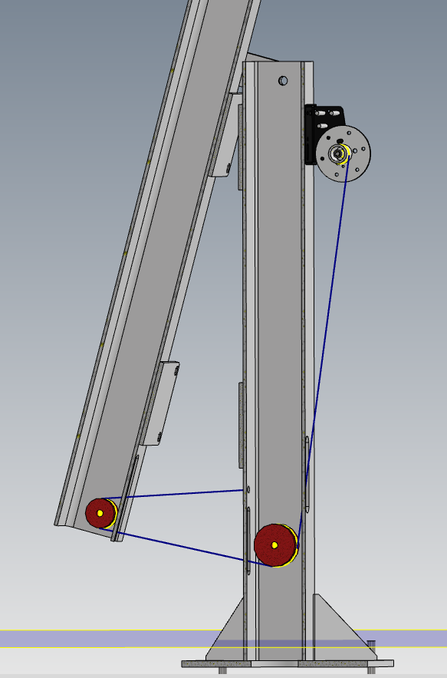
As the dish/drive/mechanics are quite heavy (>300 Kg), and because of the CG of the system when in the upright position, a good deal of force is initially required when starting to tilt the tower. For now, its a two person job, one to handle the winch and one to "start the movement" of the tower. Also when rising the tower from a tilted position, the tower will move the last degrees to upright by itself (quite violently if not "guided"). I'm thinking of ways to do this more relaxed, possibly by mounting some "helping hardware" between the two tower sections. This is a future additional project.


Foundation for tower

The foundation for the tower is made of concrete. The anchor bolts are four 1 meter long M20 threaded rods, hot zinc galvanized. The rods are spaced 360 mm from each other.

Two stainless steel plates (4 mm thick each) are used as spacers, these made sure the distance between bolts did fit the plate at the bottom of the lower tower section.


The safety factor on the four threaded rods (8.8 steel, hot galvanized) is close to 11. This is at a windspeed of 40 m/s (144 km/h / 90 mph), 3 m2 (32 ft2) of wind load 3 meter above ground level. The force acting on the rods is 2600 Kg in that case (which will be divided by 2).

Rotor/Slewdrive

The slewdrive arrived from Coresun in China (3 days express delivery). 

As usual, excellent service from Coresun and Jason, all arrived in perfect condition and very well packed.


Speed of the drive was tested at 24V (100% PWM duty cycle) under no load (just sitting on the bench):

  • Elevation moves 0.36 degrees/second. Approximately 250 seconds (4m10s) for 90 degree movement.
  • Azimuth moves 0.6 degrees/second. Approximately 600 seconds (10m0s) for 360 degree movement.

Threaded rod assembly for concrete foundation

The four M20 1 meter long threaded rods arrived. I had two stainless steel plates laser cut.

Got the plates from Scandcut.com in Sweden, fast service and very reasonable prices. 


Breaking ground for foundation

Had the hole made and concrete poured for the foundation. The hole is 1 x 1 meter square and 1.5 meter deep. The hole was inspected and quality checked by our two cats, Emma and Frede.


The four M20 threaded rods and two stainless steel plates are embedded in the concrete.

A 110 mm pipe runs to the house/shack, close to the dish is a small "well" where the cables can be connected and routed. The "well" has an extra outlet, this will be used for a future 10 GHz EME project that will be placed next to the 4.8M dish.


Mechanics and dish arrived

All the mechanical parts was shipped in only two days to me from Zdenek OK1DFC. All parts have been hot galvanized (needed here because of the weather). Everything looks very nice and completely as expected, Václav OK3VM who did the mechanics, was a real pleasure to work and communicate with during the process.


Test fitting the parts for elevation on the SVH7 drive in the lab/shack, all fits perfect.

Wheels for wire/tilt system

In the tower sections, there are large aluminum "U" grooved wheels in both the lower and upper parts to guide the stainless steel wire for the tilt system. These wheels, made from 6061 aluminum, were chosen for their expected lower load capacity. The wire is directed to a hand-operated winch with a maximum working load of 1130 Kg (the winch was later changed to a AL-KO 901A Plus type, see below). To secure the wheels in place, two M16 bolts were used. This setup ensures hopefully smooth operation and reliable functionality of the tilt system.

End stop solution for the SVH7 Slewdrive

As the SVH7 Az/El drive seems to have almost infinite strength, the risk of not having physical end-stops is too high in my opinion. My URC rotorcontroller has all kinds of safety features built in (overcurrent, watchdog on movement etc.), but if everything fails and the rotor continues to run without control, it could destroy the dish (if elevation fails) or destroy all the cables (if azimuth fails). Both of these things I would very much like to avoid if possible at all. The end stop system will prevent excessive movement in azimuth and elevation, the end stop sensors can be overridden by a key operated switch located on the tower. This enables "out of limit" operation during assembly/service situations. The box containing the key switch also have an emergency button, hitting that will disconnect the two motors completely from the rotor controller outputs.


Endstop for elevation

I designed two different brackets for the elevation, one (the blue and orange parts on the screenshot below) that can hold a sensor (magnetic) and one that can hold the magnet/actuator (green part on screenshot). The sensors are mounted on the "fixed" part of the drive and the magnet/actuator moves with the elevation. The sensors controls two relays (with power diodes over the contacts), if a sensor gets activated by the actuator, the movement will stop in that direction, and the only movement possible is in the opposite direction. The brackets were 3D printed in PETG filament (UV safe etc).

Dish in -15 degree elevation (this is minimum possible due to mechanics, so will set the limit to that).

Dish in 95 degree elevation (this is maximum).

First version of the elevation end stop parts, the final version has a slot instead of the single bolt hole.

Endstop for azimuth

The end stops for azimuth was a little bit more difficult.

Again I use the same magnetic switches as used on the elevation end stops. I made a (3D printed) "L" formed bracket that mounts on the two holes for the greasing points (see below) as there was no other mounting holes available on the azimuth drive. I "L" formed bracket has elongated holes for the two sensors, this means their position can be tweaked once installed on the rotor/tower. From the CAD design, it seems that azimuth limits will be below 5 degrees and above 358 degrees, this is of no concern as the moon never gets that far in azimuth here at my location. 


The azimuth sensors also controls two relays (with power diodes over the contacts), if a sensor gets activated by the actuator, the movement will stop in that direction, and the only movement possible is in the opposite direction. These brackets were also 3D printed in PETG filament (UV safe etc.). More pictures once all is mounted on the drive.

Dish at 5 degree azimuth (this is minimum):

Dish at 358 degree azimuth (this is maximum):

As the protective tubing around the cables comes close to the bracket that holds the magnets for the azimuth endstops, I choose to have the bracket made in CNC milled aluminium with nice round corners instead of the 3D printed one. Also the bracket that holds the sensors for the azimuth endstops was made in alumium instead of 3D print material.

End stop control/interface board

Designed a small and simple PCB with relays and diodes etc. for the end stop handling. The board has inputs for an emergency stop (normally closed contact) as well as a "override" (key operated switch, normally open) signal. The emergency stop cuts power to the four relays, this will disable both the elevation and the azimuth motors immediately. The override input will override the end stop sensors (two relays will short the four end stop sensors) if that is needed for whatever reason during service/adjusting (pulling the emergency stop during override will still stop the motors). 


The traces that carries the motor current is covered with solder in order to handle the large current possible (8 Amp). The board also has 5 LEDs, one that shows +12V is present from the rotor controller and four LEDs for the four end stops present, when the LEDs are on, the end stop is NOT active.

The PCB will be built into a (202 x 152 x 90 mm) box from Altech, part number 200-409-01, datasheet: PDF file.


The theory behind using relays and diodes for end stops like this can be seen here.


The two cables from the slewdrive (Az and El) will connect using 6P+PE connectors. The cables from the end stop sensors, emergency stop/override switch will enter the box thru cable glands. The two cables from the rotor controller (six wires for encoders and 12V, and four wires for the two motors) are also connected using a 6P+PE and a 3P+PE male connector.  

Box with emergency switch and end-stop override key switch.

Parts and files for end stop solution

In this section you can find the files (STL and Gerber files) for the end stop solution. The STL files are for the 3D printed parts, Gerber files are for the PCB. You will also find a BOM list for the parts on the PCB etc.


The "Azimuth actuator bracket" I ended up getting in aluminium from Scandcut.com in Sweden.


Files:

  1. File for elevation upper and lower sensor bracket (2 needed), STL file
  2. File for elevation actuator bracket (1 needed), STL file
  3. File for azimuth sensors bracket (1 needed), STL file
  4. File for azimuth actuator bracket (1 needed), STL file
  5. Gerber files for the end stop PCB (1.6mm thick, 4 layer, JLCPCB f.ex), ZIP file


Apart from this, you will need:

  1. Box for PCB, Altech, part number 200-409-01, datasheet: PDF file.
  2. 6P+PE female socket, 2 needed, link to Mouser
  3. 6P+PE male connector, 2 needed, link to Mouser
  4. (Connectors from the box to your own rotor controller, depends on installation)
  5. Magnetic sensor, 4 needed, link to Mouser
  6. Magnetic actuator, 3 needed, link to Mouser
  7. PG9 cable glands, 5 needed (available different places)
  8. Emergency stop button (Normally closed) and a Key operated switch (normally open) and a box for these
  9. Various cables etc. as dictated by your specific installation


BOM file with components on the PCB, link to PDF file


The list above only includes the two 6P connectors to the drive motors, you need to find a suitable connector for your own rotorcontroller, it all depends on your specific installation.


Cabling/interconnections

In this section, all connections between tower and shack are shown. I know this is (very) specific to my installation, so it is more for my own documentation. 


Most of the "DC/AC" cables I got from STEX24 in Germany, most of the coax and RF connectors I got from either RF Microwave in Italy, from AW Broadcast in Germany or from Koax24 in Germany.


Cables between shack and tower:


  1. 3 x 2.5mm2 "rubber" cable, this is mains power, 230VAC / 16Amp
  2. 4 x 2.5mm2 screened cable, drives the two DC motors in the SVH7 Az/El drive/rotor system
  3. 7 x 0.5mm2 screened cable, (6 wires used) connects to incremental encoders in the Az/El drive, supplies 12VDC also to encoders
  4. 18 x 0.5mm2 cable, this is for a multitude of signals, controls PA modules, LNAs, relays etc.,
  5. CAT6 screened Ethernet cable, this is for network connections to PA modules using my REPAM modules
  6. 2 x 18.5 meter 1/2 inch RFS CELLFLEX SuperFlexible foam-dielectric coax (with N male/male) from outside shack to base of tower for TX/RX.
  7. 2 x 4 meter long LMR-240 N male/female cables from outside shack to radio(s)
  8. 2 x 3.5 meter LMR-400-UF coax (incl. N female and N male) from base of tower to PA boxes on elevation frame.
  9. Protective tubing (56 mm outer diameter, 48 mm inside diameter) for cables around the rotor and down the base of tower, link to tube 


Measured insertion loss for the RF cables from tower to radio:

2 pcs 4 meter LMR-240, N male/female (from radio to 1/2" CELLFLEX):

432 MHz: 0.65 / 0.65 dB (theoretical, without connectors, 0.70 dB)

1296 MHz: 1.22 / 1.22 dB (theoretical, without connectors, 1.20 dB)

2320 MHz: 1.73 / 1.70 dB (theoretical, without connectors, 1.68 dB)


2 pcs 18.5 meter CELLFLEX SCF12-50J cable, N male/male (from shack to tower base):

432 MHz: 1.23/ 1.20 dB (theoretical, without connectors, 1.30 dB)

1296 MHz: 2.39/ 2.34 dB (theoretical, without connectors, 2.26 dB)

2320 MHz: 3.15/ 2.93 dB (theoretical, without connectors, 3.16 dB)


2 pcs 3.5 meter LMR-400-UF, N female/male (from tower base to PA boxes):

432 MHz: theoretical, without connectors, 0.37 dB

1296 MHz: theoretical, without connectors, 0.63 dB

2320 MHz: theoretical, without connectors, 0.88 dB


Cables "at the dish":


  1. 270 cm 7/8 inch CELLFLEX LCF78-50JA from feedhorn to center of dish (for TX)
  2. 110 cm RG-393 PTFE cable (x2) from center of dish to PA box(es) (for TX)
  3. 300 cm LMR-400-UF coax (incl. N female and N male) from feed horn to center of dish (for RX)
  4. 200 cm LMR-400-UF coax (incl. N female and N male) from center of dish to PA Box(es) (for RX)


Measured insertion loss for the RF cables "at the dish":

1 pcs 270 cm 7/8 inch CELLFLEX LCF78-50JA (7/16 male/female) (TX cable from center of dish/hub to feed horn):

432 MHz: 0.06 dB (theoretical, without connectors, 0.07 dB)

1296 MHz: 0.15 dB (theoretical, without connectors, 0.13 dB)

2320 MHz: 0.21 dB (theoretical, without connectors, 0.17 dB)


2 pcs 110 cm RG-393 PTFE cable (x2) from center of dish to PA box(es) (for TX)

432 MHz: 0.14 dB / 0.16 dB (theoretical, without connectors, 0.18 dB)

1296 MHz: 0.32 dB / 0.35 dB (theoretical, without connectors, 0.42 dB)

2320 MHz: 0.44 dB / 0.50 dB (theoretical, without connectors, 0.64 dB)


1 pcs 300 cm LMR 400-UF coax (N male/female) from feedhorn to center of dish (for RX)

432 MHz: theoretical, without connectors, 0.32 dB

1296 MHz: theoretical, without connectors, 0.60 dB

2320 MHz: theoretical, without connectors, 0.75 dB


2 pcs 200 cm LMR 400-UF coax (N male/male) from center of dish to PA box(es) (for RX)

432 MHz: 0.30 dB / 0.30 dB (theoretical, without connectors, 0.21 dB)

1296 MHz: 0.53 dB / 0.58 dB (theoretical, without connectors, 0.40 dB)

2320 MHz: 0.91 dB / 1.10 dB (theoretical, without connectors, 0.50 dB)


All cables to the tower are kept inside a protective tube. It is routed from the base of the tower to the dish/elevation system.

The tube is fastened on the SVH7 drive and approximately 60 cm down on the upper tower. The tube has a slight curve to it so it will be able to go around the upper tower at max/min azimuth.

Cables from left to right:

  • 2 x 1/2" RFS CELLFLEX coax
  • CAT6 cable for ethernet
  • 18x0.5mm2 for various signals
  • 7x0.5mm2 for encoder signals (quadrature)
  • 4x2.5mm2 for power for az/el motors
  • 3x2.5mm2 for 230VAC/16A power

URC rotorcontroller to end stop box

Cables from URC rotorcontroller to the "End stop box" mounted on the SVH7 Az/El drive gear.

The cables used:

  1. 6+PE 0.5mm2 screened cable for encoder signals/power: Link to cable
  2. 3+PE 2.5mm2 screened cable for power to Az/El motors: Link to cable

At the URC rotorcontroller, cables are connected using a SUB-D9 Male connector (for encoder/power) and a 4 position pluggable screw terminal. At the end stop box, a 6P+PE and a 3P+PE male connectors are used.

The total cable lengths are approximately 25 meters. I also made two 3 meter lengths of cables with the same connectors so I can place the rotorcontroller next to the tower during building/testing.


Cables from SVH7 drive to end stop box

Both the Az and El motors/planetary gears have a 6+1 wire cable coming out of the back of the motor/gear assembly. These cables are both terminated in a 6P+PE male connector, these connects to the end stop box located on the SVH7 El motor/gear tube.

Various signals, 18 wire multicable

From the shack to the tower I have a 18 wire cable running (0.5mm2). This cable caries a wide variety of signals, power-on of the PA modules, bias to the PA modules, power to LNAs, relays etc. 

The first 7 wires of this cable are also routed to the 6+PE screened cable that connects to the feedhorn installed. This carries LNA power etc. 

One end of the cable are terminated in the "Dish control box", described further down this page, the other end terminates in the 23cm PA box. A cable/connector on the 23cm PA box then carries all 18 signals to the 70cm PA box (the two PA boxes sees all 18 signals).


18 wire cable for various signals (18 x 0.5mm2), link to cable.

Terminated in a IP67 SUB-D 25 connector at the PA box(es), link to connector. and at the dish control box in the shack.


This list will be updated as the project progresses.

230VAC/16A power to tower

From the shack to the tower (the two PA boxes on the elevation arms) a 3x2.5mm2 cable carries mains power (230VAC/16A). This is power for the two PA boxes (70 and 23cm). The cable from the shack is connected to the right PA box (23cm) using a Amphenol 3P+PE female connector. On the right box, a 3P+PE female socket is located, this connects to a cable that is routed to the left (70cm) PA box.

Mounting of tower parts

I got the lower and upper towers mounted. This was luckily a "non event", everything went together smoothly. With the help from my good friend Lars Robert, a ladder and a winch, we got everything lined up and mounted. The Az drive part of the SVH7 Az/El drive was first mounted. A couple of days later, I mounted the elevation drive and the rest of the mechanics. Separating the Az/El sections of the SVH7 from each other made installation a lot easier. The combined weight of the Az/El parts are 85 Kg. Separate, I estimate the elevation part to be around 45 Kg and the Az part to be around 40 kg. I gave the central part of the elevation drive some metal primer as it is "raw untreated steel".

I finished up the installation doing some testing of the movement of both axis, everything seemed to perform as expected.

A few days later, I installed the rest of the elevation mechanics, again a perfect fit.

Video showing movement of elevation.

Test fitting hub and a couple of ribs, just to see if everything fit (it did :)

Preparing aluminium rings

The rings that supports (the ribs and) the mesh, are made of 30 x 3mm flat aluminium strips. There is a total of eight six meter lengths coming with the dish kit. These needs to be cut to length and drilled. The dish kit is delivered with a manual with drawings and measurements. Took me only half a day to get everything drilled and ready.

To help with drilling the 6mm holes, I made a small 3D printed jig. Using this it was just a matter of making a line where each hole should be located, place the jig above this line and drill (with a 4mm drill) a "pilot mark". This was then drilled with a 6mm drill afterwards.

File for 3D printing the drill jig, STL file


Installing ribs

Next up is installing the 16 ribs. They are installed with five M5 screws in the lower hub plate and three M5 screws in the upper hub plate. It was a real breeze to install these, went together very easy. It helped having the dish "levitate" above the ground, this gave me a good working position to install the 128 screws that holds the ribs to the upper and lower part of the central hub. After installing the ribs and mesh, the "cross braces" between the ribs will be installed.


I installed a bracket on the central 60mm tube, 3D printed a 3mm thick piece of plastic to act as a temporary "bearing". This enabled me to "spin" the dish while installing all the mechanics on the dish. Once done, the bracket is removed and the lower hub plate is secured to the structure using eight M12 bolts.


Installing braces between ribs

I test fitted the outer brace between ribs on all 16 ribs. Also tried installing the three smaller braces between two ribs, just to check. The rest of the braces was installed after I had mounted the mesh, this made it a lot easier to move around below the dish when mesh was installed (less injury to my head ;).

Installing feed support tube

The 60x3mm aluminium tube that will hold the feedhorn(s) was installed. It is mounted with some heavy milled aluminium blocks to the central 60mm steel tube that goes thru the center of the hub.


The aluminium tube will later on be supported by 3 stainless steel wires that will connect to the outer rim of the dish. This will prevent any sagging of the aluminium tube, although it is 60x3 mm, it will sag a bit under the weight of feedhorn(s) and cables (especially the 7/8 inch hardline).

Changing the winch

Initially, I got a cheap(ish) winch for folding the tower. While the winch worked ok, it was a nightmare to listen to it while using it. There was a loud "clicking" sound from the brake on it, and that sound was amplified thru the lower tower section to a point where it was unbearable. So I changed the winch to a 900 Kg AL-KO 901A Plus instead. This is the same winch I use on my 15 meter tilting tower for my HF antennas.

Link to the AL-KO 901A Plus winch.

I used a small hydraulic jack to raise the upper tower just a single mm, this allowed me to remove the M20 bolt that the upper tower pivot around (the 2 x 4 M12 bolts that holds the two towers together were then fastened).

I could get my hands inside the lower tower and remove the bolts that held the old winch, and also I could mount the bolts for the new winch. Re-installed the M20 bolt, removed the 2 x 4 M12 bolts and tilted the tower back down again so I could continue the assembly work.

Testing elevation movement

While I changed the winch (see above) I tested the elevation (and azimuth) drives, I moved the dish from 0 degree elevation all the way to 90 degrees. The maximum current drawn from the elevation motor was 1.8A (later on with mesh and cross braces installed the peak was 2.1Amp). No load current was around 0.6 A. The motor is specified as 8A maximum working current. This was obviously without feedhorn, feed cables etc. which will add a good amount of weight. The PA boxes that will be mounted on the two arms going to the back is estimated to weight around 60 Kg total, so they will compensate for some of the weight. All in all, I don't think I will have to add any (extra) counter weights to the system. Time will tell. I did some calculations of the load on the elevation drive here.


Mounting rings

Started mounting the five rings. These rings will (together with the ribs) hold the mesh. The rings were previously cut and drilled. The innermost ring had to be "pre bent" a little to make it easier for it to be placed onto the cutouts in the ribs. The other rings could just be mounted without any pre-bending. The dish kit comes with some "L" formed brackets, these are used to secure the rings to the ribs, a VERY easy and simple job!


Removing eight bolts enables me to rotate the dish freely while working on it, really nice!

Next up is cutting the rest of the mesh and attaching it to the ribs and rings. Test fitted a single section again just to get the feeling of seeing the end of the tunnel :)


Still need to mount the braces between ribs (the "bottom" of the ribs), only the one closest to the edge of the dish are mounted as of now. I will mount the others once the mesh is on, make it a bit easier to navigate under the dish without these braces mounted.


Preparing to cut mesh for surface covering

Using CAD, I made a template for the cutting of the mesh. I decided to cut the mesh in "pie" shaped pieces. The mesh I got delivered is 1 meter wide in 25 meter rolls. The distance between the 16 ribs at the outer ring is 94.2 cm. By angling the mesh pieces, I managed to cut the mesh so that I could get 39mm of overlap on each side of the ribs. Below is a schematic view of the measurements/cuts.


The curve on each rib, is 2548 mm long (the diameter of the dish is 4800 mm/radius 2400 mm). The top hub circular plate is 400 mm in diameter, so some of the mesh needs to be cut (the triangle missing on the white part below).


I ended up cutting eight pieces of 294 cm mesh. These where then divided in two, on both sides I started the dividing line 188 mm from the end of the piece. I found that the cutting was done very easily using an angle grinder.

This consumed close to 24 meters of mesh, each roll of mesh has 25 meters, so that left me with a small extra.

Plan for cutting and trimming the eight pieces of mesh.

After I cut the first two sections, I temporarily fitted a section to the dish, just to make sure that the dimensions were correct. The section was just attached using a few cable ties. Once the mesh is mounted, it will be held using stainless steel wire, more on that later on

The rest of the sections were cut, it was extremely easy with the angle grinder. I placed three 294 cm sheets on top of each other, clamped them between two pieces of wood so I had an edge to follow with the angle grinder. This way I could cut six sections (out of 16) in one single operation.

Mounting the mesh

Finally I started on mounting the mesh to the ribs and rings. This is usually very time consuming and not the most "funny" job in dish construction! This time however, was not as bad as the first two dishes (5M and 8M) I made 32 and 25 years ago. This time I used 0.6mm stainless steel wire to fasten the mesh. I use a special tool (aircraft safety wire twisting tool) for twisting the wire, makes it very easy (and fast) to do the job.
When all the mesh was mounted, I estimate I used around 180 meters of 0.6mm stainless steel wire (around 800 attachment points) to mount the mesh.

I added two 3mm holes in the ribs to secure the mesh at the outer part of the ribs.

First three sections of mesh mounted.

All 16 sections mounted.

Dish in upright position

The tower was raised to vertical position, did some testing of the protective tubing that will hold all the cables etc. Managed to get a good placement of it so the tower can still tilt and azimuth can move without interfering with the tube/cables. Designed and 3D printed some "clamps" that holds the tube in place on the tower sections.


Moved the elevation axis from -15 degrees to +90 degrees, max current seen on the controller was 2.1 Amp. Motor current was 0.6 Amp under no-load (maximum allowed is 8 Amp for the elevation motor). When turning in azimuth, maximum current on azimuth motor was 0.6 Amp (same as no-load).

Dish elevated to -15 degrees.

Cable management on tower

Managing cables around a rotor is always a challenge. Managing cables around an azimuth AND elevation is even an bigger challenge. On this setup, I'm using a "spiral protection tube" (link to tube at Stex24 in Germany). The tube has an inside diameter of 48 mm and outside diameter of 56 mm. The tube has a thick spiral made of steel and is both very sturdy and very flexible at the same time.


The first obstacle is getting all the cables past the azimuth rotation. I designed a bracket (4mm thick aluminium) that is mounted on two of the very large screws that connects the elevation part of the drive with the azimuth part. I also designed two 3D printed "trumpets" that are attached on each side of the aluminium bracket. The trumpet that attaches to the spiral tube has inside threads , this allows it to be screwed onto the spiral tube, locking and securing the tube in place.


Bracket plate, STEP file

3D printed trumpet for protective tube, STL file

3D printed trumpet for cable exit, STL file

It turns out that the tube can be attached on the upper tower part and "curl" around the tower when going from minimum to maximum azimuth. I mounted the tube temporarily with cable ties and tested the movement numerous times, optimizing the attachement points and length of the tube. The selected position also allows me to tilt the tower over for maintenance/repairs etc.

The first clamp will be mounted 50 (changed to 60) cm below the plate where the Az drive are attached, the length of the tube from this attachment point to the upper end of the tube is 85 (95) cm, this seems to be enough for the tube to "fold" nicely around the upper tower when going form minimum azimuth to maximum azimuth.

The protective tube will extend all the way down into the 110mm underground pipe (thru a 3D printed adapter) that carries the cables to the shack.


Pictures below shows the protective tube with the dish at 250 degree azimuth and at 340 degree azimuth. The protective tube is attached to the upper tower in the "160 degree azimuth" direction.

3D printed (in PETG) brackets that holds the tube to the tower sections and an adapter that will allow the protective tube to enter the undergrund pipe. The brackets is held onto the tower by stainless steel hose clamps (8 mm wide, 0.8 mm thick "endless" hose clamps, cut to length).

Still missing the alu plate that will hold the "trumpet" to the Az/El drive, just fastened with cable ties at the moment.


Clamp for attaching protective tube to tower, STL file

Tested various placements of the cable around the elevation mechanics. Managed to find the sweep spot.

The cables are attached to the elevation arm 60 cm from the square frame that is attached to the back of the dish. The cables are 80 cm long from where they exit the protective tube and until the attachment point on the elevation arm.

Received the 4mm thick laser cut aluminium plate that holds the two 3D printed "trumpets" for the cables.

Mounted the two "trumpets" and the aluminium bracket on the SVH7 slewdrive. Also routed cables from the protective tube and back to the two "elevation arms" which will hold the two boxes with PA modules in.

Feedhorn and support

The feed horn, at first for 23cm, is mounted on the 60x3mm aluminium feed support tube. This tube extends out 2.5 meters from the surface of the dish (focus point is at 192 cm from dish surface). At the surface it is attached to the central tube using two aluminium bracket assemblies. The feed support tube are offset 320 mm from the center axis of the dish.

As the feed support tube will sag/deflect a bit, especially when the feed horn are mounted, three stainless steel wires are attached at the end of the tube, the other end of these wires are attached to the rim of the dish (on three ribs).

At the end of the feed support tube, the stainless steel wires are attached using a small aluminium clamp I designed.

Below are some views and pictures of this.

Bracket for attaching 60mm feed support tube to central tube, bottom part with threads, STEP file

Thread info for bottom part, PNG file

Bracket for attaching 60mm feed support tube to central tube, top part without threads, STEP file

Round bracket for attaching wires to 60mm feed support tube, STEP file

Bracket for feed support (12 mm thick aluminium), STEP file

3D printed the "feed support tube wire holder" to see if it would fit as intended. Seemed to be ok, part ordered in aluminium. 

Got the CNC milled wire bracket and the two feed horn brackets (both done in 12mm thick aluminum, anodized surface.

Also designed and 3D printed a "end cap" for the feed support tube, holes for 7x0.5mm2 screened cable, LMR400-UF (RX) and 7/8 inch CELLFLEX (TX) cables

Mounted DIN 7/16 male connectors on a piece of 7/8 inch CELLFLEX cable (see cabling section) and did a testfit of the cable. Also shortened the feed support tube to the planned 250 cm length. So far everything seems to go as planned.

In the final installation, the TX port of the feedhorn will connect to the 7/8 inch CELLFLEX using a short piece of RG-393 cable. The RX coax (N connector) and the control cable will both connect directly to the preamp box mounted on the feed horn.

Tower mounted electronics

I have chosen to mount the power amplifiers for 23cm and 70cm at the tower. This is mainly to reduce cable losses but also to save some room in my lab/shack (which is already quite busy :)


Mounting high power electronics "outside" poses some challenges (moisture and temperature). I previously mounted a 500W 70cm PA on the tower of my 70cm Yagi EME system, this has been running fine for a couple of years now.


Below are some details of the implementation of the power amplifiers. It is a "project under construction", I will change this section as the project progresses.


The two "PA boxes" are mounted on the two "elevation arms" on the dish system. Each box is made of stainless steel and measures 70x50x25cm.

On the screenshot below, the two boxes are located on the elevation arms, the red cables are all 7/8 inch CELLFLEX cables for the transmit signal. Each box has a TX output, one of these are connected via a piece of RG-393 to the 7/8 inch CELLFLEX cable going out to the mounted feedhorn. Depending on which feed horn are mounted, either the 70cm or the 23cm PA are connected. The same goes for the LMR400-UF RX cable (not shown on the screenshot below).

23cm PA connectors

70cm PA connectors

Test fitting the two PA boxes. Each box has two eye bolts on the top, this makes it easy to install and lower the boxes if/when service is needed.

23cm PA box

In this section some details of the 23cm PA box will be shown. 


Major components of the 23cm amplifier:


Below is a simplified schematic view of the most important components of the 23cm PA box.


Output cables - PA to output hybrid

Test of input splitter and output combiner for the 23cm PA. Tested phases and measured insertion loss etc. 

The total loss thru the setup (excluding cable loss) was measured to be 0.365 dB. Out of this, the input splitter has 0.33 dB loss and the output combiner only 0.035 dB.

For the purpose of experimenting, I tried to insert various adapters changing the phase for one of the sides and used the calculator at the bottom of the 90° hybrid page to calculate the phase error based on the power measured at the OUT port and the ISO port. The calculation predicted an phase error of 27.49°, my R&S VNA measured the phase error to be 26.8°, and error of only 0.69°.


In the real setup, I can either tweak the length of the input cables or I can fit small trim-caps on the outputs of the input splitter. Still to be determined what will be the best solution.

Assembled two RG-393 cables (each 25 cm long) with DIN 7/16 and N connectors (both right angled), these connects the PA modules to the 90° hybrid output combiner. I measured the cables on my VNA, the phase difference between the two cables is 2.4° (this corresponds to 1.073 mm in RG393 cable. This is a close as I can get.

The insertion loss on 1296 MHz is around 0.12 dB (25cm RG-393 is approx. 0.075 dB, that leaves 0.035 dB for the connectors).

Connector at 90° hybrid end of cable: DIN 7/16 right angle for RG-393.

Connector at PA module end of cable: N male right angle.

Cable used: RG-393


Output cable - output hybrid to directional coupler

RG-393 cable (53 cm long) with DIN 7/16 male right angle connectors at both ends. This cable connects the output of the 90° hybrid combiner to the directional coupler at the output of the amplifier (which connects to the CELLFLEX 7/8 inch cable from the dish/feedhorn).

Connectors used: DIN 7/16 right angle for RG-393.

Cable used: RG-393


Due to lack of adapters, I could not (yet) measure the insertion loss of this cable. From the loss figures of RG-393 it should be around 0.15 dB for this 53 cm long piece of cable (plus a small amount for the connectors).


This brings the total loss from PA modules to directional coupler to around 0.30 dB.

Isolation port - output hybrid

Cable from isolation port on 90° hybrid output combiner to a 400W attenuator. This cable will deliver the power present on the isolation port of the output combiner, ideally, the power should be zero. However, in real life there will always be some power present due to imbalance in the phase on the two PA modules and the cables/connectors to them. Also, approximately 50% of any reflected power from the antenna will show up on the  isolation port (with the remaining 50% being split 25/25 to each of the PA modules outputs)!

In worst case, if one of the two PA modules fails, the attenuator will see half the output power (or if the antenna disconnects). On the output of the attenuator, a Dual RF Head senses the power (the same Dual RF Head sensor also monitors the isolation port power on the input 90° hybrid splitter). The Dual RF Head are connected to the REPAM module, this will do an immediate shutdown of the complete PA system and report an error to the remote PC application if the power measured on the isolation port(s) exceeds a preset level.


As there is a directional coupler mounted at the output of the PA box, the REPAM module will be able to monitor the forward and reflected power from the antenna, this will allow the system to know where the power on the isolation port comes from, either due to phase error (or a PA module going defect) or if it is reflected power from the antenna (as this would show up on the reflected port of the directional coupler).


Cable used is a piece of Huber+Suhner SUCOFORM 250.

1 x Huber+Suhner DIN 7/16

1 x Huber+Suhner N male

1 x N female/female adapter


Calibration values for the Dual RF Head that monitors the isolation ports on the input and output splitter/combiners.

This is mostly for my own documentation.

Values are taken using the driver PA as source. Reference power levels (0.8W, 7.8W, 5.36W and 35.7W) are taken thru 100W 30 dB attenuator (+ 3 dB external attn.), insertion loss measured at -33.57 dB on VNA. Calibration values are done with the correct cables used for the coupled port to Dual RF Head connections.

Input cables - splitter to PA

Cables that connect the input 90° hybrid splitter to the two PA modules. Cables are 60cm long RG-316 with right angle SMA male connectors at each end.

Connectors used: SMA right angle.

Cable used: RG-316.


The measured loss of each cable is 0.65 dB and phase difference is 0.6°.


Humidity control

In order to handle moisture in the PA boxes, I have mounted two 50W wire-wound resistors in each of the PA boxes. These will be driven by 12V and controlled by the REPAM devices. The REPAM device can connect (via the 1wire bus for the temperature sensors) to a combined humidity/temperature sensor. Using this sensor, REPAM constantly calculates the current dewpoint temperature, in case any of the temperature sensors in the system detects a temperature getting "too close" to the dewpoint temperature, the heating elements will be turned on.

Each of the 50W resistors is 5.6 Ohm, this means that at 12V they will each dissipate around 25W.


The initial test showed that, after some time, the heatsink would rise approximately 12° above ambient (24°C). This was measured at the LDMOS with the 1wire temperature sensor mounted.

Humidity/temperature sensor, picture shows the installation in my 500W 70cm PA for my 70cm EME system where it also monitors the dewpoint

PA Monitor application for REPAM

Started to make an "expanded" version of my PAMonitor application for my REPAM module.

It is based on the "PAMonitor" application shown on the REPAM page (the PAMonitor application is available as a C# project that you can modify yourself if needed).


The application shows the various parameters from the amplifier, it also handles alarms (both in text and voice messages) as well as generating logging data for all parameters (as a .CSV file). All bargraphs, max/min/error and warning values can be configured, alarms can be set etc.


The test below shows a large reflected power, this is due to a somewhat marginal 800W dummyload, an CF-800 from Microset, which is specified up to 1 GHz, but claimed to be useable on 23 cm also..

Some of the power indicated on "ISO Out" is because of the somewhat large reflected power. The "ISO Out" is the isolation port on the 90° output hybrid. Approximately 50% of the reflected power will arrive on the isolation port, the remaining 50% will be equally, more or less, split between the two PA modules.


Data from "Details" tab:

Driver for PA

Did some tests of the small PA that will be used to drive the two large modules. I decided to run the driver at around 14V. This ensures that it is not "too hot", I need approximately 20 to 25W output power from it. I will mount a 10W/10dB attenuator on the input, that together with the cable loss from the shack to the PA box (around 3 to 4 dB) ensures that even at 100% drive power from my IC-9700 (10W approx.) no disaster should happen.

Below are some results from the driver PA.

First test of 23cm PA

Before assembling the 23cm PA completely, I ran some tests at close to full power. I used the Dual PAMonitor PC application to log the data to a CSV file. The result of one of the runs are shown below. Maximum power input to the input splitter was around 17W in the test below.


During testing at close to full power (output around 1.1KW) I noticed once in a while communication errors with the 1wire temperature sensors that are located inside the two aluminium boxes with the PA modules. The sensors communicates using 1wire protocol which is a bit sensitive to noise and timing. I ended up relocating the sensors from the position next to the LDMOS to the screw at the corner at the input end of the board (just below the ferrite for the bias connection, see below).

Calibration of Dual RF Head for FWD/REF measurements

Just to validate the numbers for calibration of the Dual RF Head used for measuring the forward and reflected power at the output I made a sweep of the A and B inputs of the Dual RF Head used. The sweep was one on my SMU200A signal generator. The A and B inputs was swept from -40 to +5 dBm.

The directional coupler I used was also measured on my R&S ZNLE3 VNA. 

I measured the completed setup as it is used in the PA. The FWD port had 20 dB attenuator mounted and the REF port 6 dB. Both these and the connecting cables were included in the measurements.


First S31 is shown, this is the coupling for the FWD port (including the extra 20 dB attenuator), we see it is -62.50 dB:

Next S42 is shown, this is the coupling for the REF port (including the extra 6 dB attenuator), we see this is -48.74 dB:

Looking at the spreadsheet above, the calibration values for 112/600W and 13.5/93.3W for FWD/REF is shown. The calculated power levels are also shown, these takes into account the S31/S42 of the directional coupler and the added attenuators. The calibration values was done on the signal generator, but we see that the calibration and expected power levels match well with the real numbers measured, at least for the FWD port, even though it has been done on separate instruments (A Bird 43 meter and a HP mW meter/calibrated dummyload was used during calibration). The calibration of the REF port will have to be re-done in order to try and optimize this a bit more.


For the FWD port: 117.8 calculated for expected 112W and 624.3W for expected 600W.

For the REF port: 15.3W calculated for expected 13.5W and 104.3W for expected 93.3W.

Calibration of the Dual RF Head that monitors FWD and REF from the directional coupler. The directional coupler was calibrated and the output monitored using my E4419B/8481A mW meter.

Test of security functions in REPAM device (high SWR)

Did a simulated high SWR condition. I set the max allowed SWR to 1:1.2 in the REPAM device (in "Trigger settings"). This allows me to validate the alarm/shutdown feature without removing the load etc.


I then connected my oscilloscope (2 GHz bandwidth) to the output of my 400W attenuator. That allowed me to catch the RF envelope from when transmission started until the PA was shut down because of the SWR situation. The complete time was measured to be 7.25 mS. This is not "the whole truth" as the SWR detection needs to see power above a certain threshold (depending on calibration point of of the Dual RF Head in REPAM Monitor), but it gives at least some idea of the reaction time to events like this.

Below is a video of the Dual PAMonitor application and the SWR alarm.

Testing of 23cm PA

Did a number of tests of the finished 23cm PA box. Below are screenshots from logged data from the Dual PAMonitor application and a video of the application during the test.

Inlet air filters

Mounted filters on the inlet of the box. These are combination of a stainless steel/alu mesh and a traditional (fabric/foam) filter.

70cm PA box

In this section some details of the 70cm PA box will be shown. Generally, the 70cm PA box is much simpler than the 23cm PA box described above.


Major components of the 70cm amplifier:


Below is a simplified schematic view of the most important components of the 70cm PA box.


Assembly of 70m PA

A few pictures from the build.

More detailed information on the PA modules/combiners on this page.

Testing of 70m PA

Did a few tests on the completed PA, just to confirm that the original measurements I made on the four module PA was still valid.

PA Monitor application for REPAM

For the 70cm PA I also made a special version of my PAMonitor application for my REPAM module.

As the Dual PAMonitor" application for the 23cm PA, It is also based on the "PAMonitor" application shown on the REPAM page (the PAMonitor application is available as a C# project that you can modify yourself if needed).


The application shows the various parameters from the amplifier, it also handles alarms (both in text and voice messages) as well as generating logging data for all parameters (as a .CSV file). All bargraphs, max/min/error and warning values can be configured, alarms can be set etc.


Below is a screenshot from the "Quad PAMonitor" application, it will monitor all important parameters of the PA system. The main difference from the "Dual PAMonitor" for the 23cm PA, is that it does not show "ISO in" and "ISO out", and instead of two current measurements, it has four (one for each of the four PA modules used).

Control box in shack

I designed a simple "control box" for the dish system. Basically it just controls the signals in the 18 wire multi cable that goes to the 23 and 70cm PA boxes. It also generates 28VDC for any SMA relays that need that (in the LNA boxes). I added a few extra switches and LED's to the box for future expansion. On the backplate are a number of RCA/Phone sockets (Bias and RX) that connects to the sequencers.

The front and packplate are both made of normal PCB material (ENIG surface and black soldermask).

Sequencers in shack

I use separate sequencers for both 70 and 23 cm. Below is the settings for these. This section will be updated along the way...

23cm sequencer setup:

23cm sequencer pictures:

Fan outlet covers

3D printed (in ABS) fan exhaust covers. Each PA box has two of these mounted over the 230V fans (outlet).

The "filter cartridge" and the cover each have M4 brass inserts mounted.


3D printable file for the cover, STL file.

3D printable file for the "filter cartridge", STL file.

Connectors and cables at PA boxes

A couple of pictures of the connectors at the two PA boxes. They follow the plan shown in the "Tower mounted electronics" section above. Everything is done so it is relatively easy to unhook the PA box(es) and take them inside in lab for service/fixing etc.

To be continued...